
Last updated: November 2026
Most IT disaster recovery plans can restore systems. Far fewer can restore the business, in the right order, fast enough, from data you can trust.
That gap is what this guide is about. IT disaster recovery is a business decision that IT executes, not an IT project the business never sees. We’ll cover how to set recovery objectives, map dependencies, choose recovery strategies, write plans people can follow, recover from ransomware, test for the recovery you’ll actually need, and measure progress. It’s written for CIOs, CISOs, IT disaster recovery and infrastructure leaders, and the business continuity leaders who need to work with them.
In this guide
- What is IT disaster recovery?
- IT disaster recovery, business continuity, and crisis management
- Why it matters
- RTO and RPO
- The gap between the business and IT
- Governance and ownership
- Mapping what’s tied to what
- Recovery strategies
- The IT disaster recovery plan
- Recovery sequencing
- Ransomware and cyber recovery
- Cloud, SaaS, and third-party outages
- Recovery at AI speed
- Testing your recovery
- Standards and regulations
- Roles and teams
- Metrics and maturity
- Making the case for funding
- Case studies
- Getting help
- Glossary
- Where to learn more
- Frequently asked questions
What is IT Disaster Recovery?
IT disaster recovery is the capability to restore the technology your business depends on (applications, data, infrastructure, and the services underneath them) after a disruption, within the time and data-loss limits the business can tolerate.
The disruption might be a ransomware attack, a cloud region failure, a failed change, a data center outage, a vendor breach, or a natural disaster. The cause matters less than the consequence: the technology isn’t available, and the business needs it back.
An IT disaster recovery program is not:
- A backup schedule
- A second data center, or a second cloud region, on its own
- A DR-as-a-service subscription
- A plan written once to pass an audit
- A test that proves one server can be restored on a quiet Saturday
Each can be part of a program. The program is the system that connects the business’s recovery requirements to IT’s recovery capabilities, documents how recovery happens, proves it works, and keeps it current as the technology changes.
Go deeper: What Is IT Disaster Recovery?
IT Disaster Recovery, Business Continuity, and Crisis Management
IT disaster recovery is one of the eight core domains of the Resilience Operating Model®, and it works best when it’s run with the other two disciplines it depends on:
- Business continuity keeps the business operating during a disruption: people, processes, facilities, and third parties. It tells IT what has to come back, and how fast.
- IT disaster recovery restores the technology those processes depend on.
- Crisis management leads the response, makes the decisions only leaders can make, and communicates with everyone who needs to hear from you.
When they’re run separately, recovery stalls at the seams: the business assumed IT could recover in a day, IT built for a week, and nobody decided who chooses the order. When they run under one governance structure, with shared requirements and coordinated exercises, recovery is faster and the trade-offs get made in advance.
Go deeper: The Ultimate Guide to Business Continuity and The Ultimate Guide to Crisis Management.
Why IT Disaster Recovery Matters
Almost every critical business process now runs on technology. When the technology stops, the business stops, and the costs compound by the hour:
- Revenue. Orders, payments, and customer transactions stop.
- Operations. Plants, warehouses, call centers, and clinics fall back to manual workarounds, if they have any.
- Regulatory exposure. Many regulators require recovery capabilities and expect you to prove them.
- Reputation. Customers remember who was down and for how long.
The question is rarely whether you can recover eventually. It’s whether you can recover what matters most, fast enough, before the damage becomes permanent.
RTO and RPO: Setting Your Recovery Objectives
Two numbers define what “recovered” means:
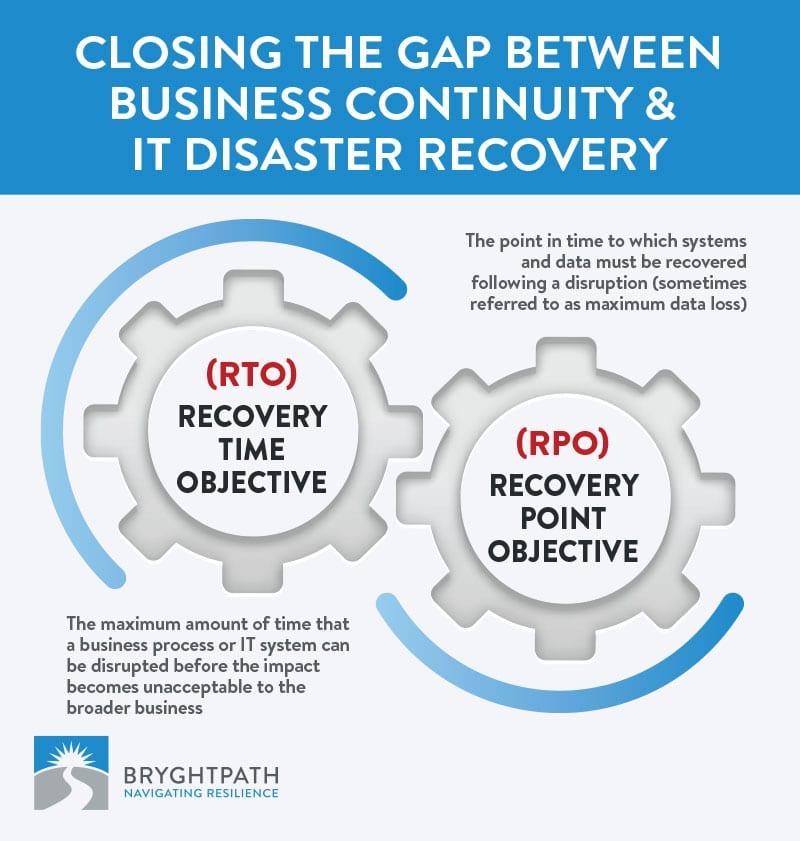
- Recovery time objective (RTO) is the longest a business process or system can be unavailable before the impact becomes unacceptable.
- Recovery point objective (RPO) is the point in time to which data must be recovered after a disruption. It defines how much data loss you can tolerate.
An RTO of four hours with an RPO of 15 minutes means the system has to be back within four hours, missing no more than the last 15 minutes of data.
Where the numbers come from
RTOs and RPOs belong to the business, not IT. They come from the Business Impact Analysis (BIA), which shows how the impact of losing each process grows over time. IT then sets recovery targets for each application to meet the RTO and RPO of the processes that depend on it.
Tiering
Most programs group applications into recovery tiers, for example Tier 1 (recover within hours), Tier 2 (within a day or two), and Tier 3 (within a week or more). Tiers are useful, but only if they’re tied to current business requirements. A system labeled “Tier 1” years ago may not be what keeps your company in business this week.
Set them honestly
An RTO you can’t meet is a wish, not an objective. When the business needs four hours and the current capability is four days, write down both numbers and either fund the gap or have an executive formally accept the risk.
The Gap Between the Business and IT
The most expensive problem we find in IT disaster recovery is the distance between what the business expects and what IT can deliver.
One client needed several critical systems back within 24 hours. The IT disaster recovery plans for those systems were built for seven days. Nobody had compared the two numbers. That six-day gap was a multimillion-dollar problem waiting for a disruption.
It happens because business continuity programs rarely give IT the data it needs, in the form and frequency it needs it, so IT makes its own assumptions about availability, RTO, and RPO. And it persists because nobody owns the comparison.
Three questions tell you whether you have the gap:
- Can your business continuity and IT disaster recovery teams explain how each critical application is recovered to the RTO and RPO the business requires?
- Can they explain the difference between business continuity, crisis management, and IT disaster recovery, and who owns each?
- Is a senior IT leader on your resilience steering committee?
If any answer is no, start there.
Go deeper: Closing the Gap Between Business Continuity and IT Disaster Recovery and The Critical Role of Business Continuity Planning in IT.
Governance and Ownership
IT should own disaster recovery. The business should own the requirements. Somebody has to own the connection.
In my corporate role before founding Bryghtpath, I inherited a business continuity program with a single sponsor and no real connection to IT disaster recovery. It took years, and a change in IT leadership, to fix. In the end, the general counsel and the CIO co-sponsored the program, with equal accountability to the CEO and a line to the executive committee and the board. The working rule was simple: the technology is IT’s box, continuity is our box, and program management is our box.
What good governance looks like:
- A policy that defines IT disaster recovery, assigns ownership, and sets requirements for plans, testing, and reporting
- Executive sponsorship from IT and the business, ideally shared
- A senior IT leader on the steering committee
- Program standards for plan content, tiering, testing frequency, and evidence
- Regular reporting on recovery readiness, in business terms
Go deeper: the governance section of our Business Continuity guide.
Mapping What's Tied to What
“We don’t know what’s tied to what” is one of the most common things we hear from IT and business continuity leaders. It’s also one of the most dangerous. You can’t recover a service if you don’t know what it depends on.
Map from the business service down, not from the server up:
- Start with the business service: taking orders, paying people, serving patients.
- List the applications that service needs.
- Add the data, integrations, and third-party services each application uses.
- Go all the way to the foundation: identity (usually Active Directory or its cloud equivalent), DNS, networking, and security tooling. Almost everything depends on them, and they’re usually missing from the map.
Mapping that starts with an asset inventory produces a list of servers. Mapping that starts with a business service produces a recovery order.
The knowledge usually exists, but it lives in a few engineers’ heads. Get it into a format others can use, and keep it current as systems change.
Recovery Strategies
A recovery strategy is how you’ll meet an RTO and RPO for a given system. Choose based on the requirement, not the technology you already own:
- Backup and restore. The lowest cost and the slowest. Fine for systems with long RTOs.
- Warm standby. Infrastructure ready to take over, with data replicated on a schedule. Hours to recover.
- Hot standby or active-active. Replicated in near real time across sites or regions. Minutes to recover, at the highest cost.
- Cloud regions and providers. Redundancy across regions, and for the most critical services, across providers.
- SaaS and third-party recovery. The vendor’s recovery capability becomes yours. Know what it is, and what you’ll do if it fails.
- Manual workarounds. Sometimes the right strategy is a business process that can run without the system for a while. Business continuity owns these.
Keep your strategies current with your architecture. I once toured a client’s primary data center and found it three-quarters empty. The workloads had moved to AWS, Azure, Google Cloud, and private clouds, but the recovery thinking hadn’t moved with them. Recovery plans built for a data center you’ve mostly left will fail you.
The IT Disaster Recovery Plan
A good DR plan lets someone who didn’t write it recover the system under pressure. Most programs need three levels:
- A master DR plan: governance, activation, roles, communication, the recovery order, and how DR connects to crisis management and business continuity.
- Infrastructure plans: identity, network, storage, compute, and the platforms everything else runs on.
- Application and business service plans: step-by-step recovery and validation for each critical application, organized around the business services they support.
Every plan should include:
- Scope, RTO, and RPO
- Dependencies, upstream and downstream
- Activation criteria and who can declare a disaster
- Roles and contacts, including vendors
- Recovery procedures, written as runbooks
- Validation steps: how you’ll know the system is really back and the data is right
- Failback: how you’ll return to normal operations
- Testing history and open findings
Keep plans where people can reach them when your systems are down. A recovery plan stored only on the network that just failed isn’t a plan.
Go deeper: our Disaster Recovery Plan Templates, including application and vendor SaaS plan templates.
Recovery Sequencing
A tier list says what matters. A sequence says what happens first, second, and third, and what has to be true before each step starts. You can’t restore everything at once; people, bandwidth, and restoration capacity are finite.
A credible recovery sequence usually runs in three phases:
- Restore a trusted foundation: clean identity, networking, and the security tools you need to watch the environment as it comes back.
- Restore your minimum viable company: the smallest set of business services that keeps the company in business, in dependency order, validating each before the next one starts.
- Restore everything else, in priority order, as capacity allows.
Put estimated durations against each step. When your executives ask “When will we be back?”, the sequence is the answer.
Agree on the minimum viable company with your executives now. During an incident, every executive believes their system is the critical one.
Ransomware and Cyber Recovery
Ransomware has changed IT disaster recovery more than anything else in the last decade. A data center fire destroys systems. Ransomware turns your own environment, and sometimes your backups, against you.
| Old View | New View |
| Ransomware recovery is an IT problem | Ransomware recovery is a sequence of business decisions IT executes |
| Backups mean we can recover | Backups mean we have something to recover from |
| Restore the most recent backup | Restore the most recent clean backup, and decide in advance what data loss you accept |
| We’ll figure out the order during the incident | We decided the order before the incident and tested it |
Why backups aren’t enough
- The clean restore point is unknown. Attackers often sit inside a network for days or weeks before they encrypt anything. The most recent backup may already contain them.
- Restores take longer than anyone thinks. One client running a large cloud platform could, in theory, restore a database, a stack, or a whole data center. On review, it would have taken weeks to months.
- Backups can be destroyed. In one case we know of, a ransomware group talked an organization’s offsite backup provider into ending service and deleting the backups. With nothing to restore from, the organization paid more than $2 million.
- Nobody pre-decided the trade-offs: accepting data loss, restoring before forensics finish, bringing customers back on reduced service.
A backup baseline
Keep copies onsite and offsite, rotate them, keep multiple generations, keep at least one copy offline and immutable, and require multi-factor authentication at your backup provider. Then test restores at the scale and speed a real attack would demand.
Recovery is part of a bigger crisis
The technical recovery is usually less than a third of a ransomware response. Legal, regulators, insurers, customers, communications, and a possible ransom decision all run alongside it. Your DR plan has to connect to your crisis management plan.
Go deeper: Your Ransomware Recovery Plan Is a Backup Plan. Here Is What It Is Missing., Building Your Ransomware Playbook, and our whitepaper Managing the Whole Crisis.
Cloud, SaaS, and Third-Party Outages
Moving to the cloud doesn’t move your recovery responsibility. It changes it. Cloud regions fail, SaaS providers have outages, and a single vendor’s bad update can take down thousands of companies at once.
Five steps to prepare:
- Map dependencies fully, including the cloud services and SaaS platforms your critical services rely on.
- Build redundancy across regions, and for your most critical services, across providers.
- Test like it’s real, including scenarios where the cloud provider is down for 8 to 24 hours.
- Lock in crisis communications for outages you don’t control.
- Involve executives and the board in the decisions a long outage will force.
For each critical vendor, know their recovery commitments, how and when they’ll notify you, and what you’ll do if they miss both.
Go deeper: third-party exercises.
Recovery at AI Speed
AI is shortening the time between a vulnerability’s disclosure and its exploitation. That breaks assumptions most recovery and patching processes rely on: that a patch exists before widespread exploitation, that change management can review patches on a normal schedule, and that you’ll face one major incident at a time.
In our 2026 client exercises, the same findings kept coming up: nobody knew their real emergency patch speed across the whole fleet, authority for production-impacting emergency actions was undefined, and teams couldn’t sustain the pace for more than a few days.
Four moves:
- Measure your real emergency patch velocity with a DR-style test
- Pre-authorize emergency decisions, with a decision group reachable in 15 minutes, around the clock
- Decide in advance which systems you’ll accept exposure on
- Plan for people: shifts, rest, and backfill for an event that lasts days
Go deeper: AI crisis exercises, The Response Window Just Collapsed, and Your AI Agent Is Now Part of Your Incident.
Testing Your Recovery
“We can restore” and “we can restore in time” are different claims. Only testing tells you which one is true.
Types of tests
- Plan review: the owners walk through the plan to confirm it’s current and complete.
- Tabletop exercise: IT, business, and crisis teams talk through a realistic scenario and the decisions it forces.
- Component recovery: restore a specific system or data set and measure the time.
- Failover test: switch production to the recovery environment and back.
- Full recovery exercise: recover a business service end to end, with the business validating that it works.
Test the recovery you’ll actually need
A test that restores one server on a quiet weekend proves very little. Test at the scale of a real event: many systems at once, in dependency order, from a clean restore point, with the business validating the result. Measure actual recovery times against the RTOs.
Test critical systems at least annually, and after any major change to the architecture. Treat every test like an exercise: hot wash immediately, an After-Action Report (AAR) within 7 to 10 days, and findings tracked to closure.
Go deeper: business continuity and recovery exercises and cyber crisis exercises.
Standards and Regulations
ISO/IEC 27031
ISO/IEC 27031 is the international standard for information and communication technology (ICT) readiness for business continuity. The second edition was published in 2025. It’s the standard we use to evaluate and build IT disaster recovery programs, including IT-led recovery testing.
Go deeper: our ISO 27031 Maturity Model.
ISO 22301
ISO 22301 sets the requirements for the business continuity management system that your DR program serves. See the standards section of our Business Continuity guide.
NIST SP 800-34
NIST’s Contingency Planning Guide for Federal Information Systems is widely used outside government as a practical reference for IT contingency and recovery planning.
Regulatory requirements
- Healthcare: the HIPAA Security Rule requires a data backup plan, a disaster recovery plan, and an emergency mode operation plan.
- U.S. financial services: the FFIEC’s Business Continuity Management booklet (2019) sets examiners’ expectations for continuity and recovery.
- European financial services: the Digital Operational Resilience Act (DORA) has applied since January 17, 2025, and puts ICT resilience and recovery at the center of operational resilience.
Roles and Teams
IT disaster recovery needs clear roles before the disruption, not during it:
- Executive sponsors in IT and the business
- IT disaster recovery manager: owns the program, standards, testing calendar, and reporting
- Application owners: own their application’s plan, recovery, and validation
- Infrastructure and platform teams: recover the foundation and the platforms
- Security: confirms the environment is clean before and during recovery
- Vendors and cloud providers: recovery commitments, contacts, and escalation
- Business continuity liaison: brings the business requirements and validates recovery from the business side
- Crisis management team: makes the business decisions and leads communications
Go deeper: Disaster Recovery Teams.
Metrics and Maturity
Report IT disaster recovery readiness in business terms, not technical ones:
- Percentage of critical applications with a current, tested plan
- Tested recovery time vs. required RTO, by business service
- Recovery gaps, with an owner and a decision for each: fund, mitigate, or accept
- Test findings opened and closed
- Dependency maps current for each critical business service
Then measure maturity. We evaluate IT disaster recovery programs against ISO/IEC 27031, which shows where the program stands and what to fix first.
Making the Case for Funding
IT disaster recovery investments rarely win on return on investment. They win on timing, persistence, and a clear, short explanation of the risk.
Years ago, a data center DR investment I proposed was rejected by the screening committee. Six weeks later, a major incident hit that exact risk. I ran into the general counsel near the elevator, explained the proposal and the cost in about three minutes, and got it fully funded. I did not say “I told you so,” at least not to the general counsel.
The lesson: keep the three-minute version ready. Incidents open windows, and you have to be ready to walk through them. Frame the case in business terms: the services at risk, the gap between required and actual recovery time, what it costs to close, and what happens if you don’t.
Go deeper: Executive Buy-In for Business Continuity and Resilience Is a Profit Center, Not a Cost Center.
IT Disaster Recovery Case Studies
All of our case studies are anonymized.
- Maturing IT disaster recovery for a health insurance leader. A leading Midwest health insurer that had never fully invested in IT disaster recovery got an ISO 27031 maturity baseline, program governance and standards, recovery requirements for on-premises and cloud-native applications, a testing strategy, and an updated master DR plan with ransomware scenario planning. Read the case study.
- IT disaster recovery for a large U.S. nonprofit. One of the largest nonprofits in the United States built DR policy, governance, plans, and tests for all of its Tier 1 applications, after 28 discovery interviews and an ISO 27031 maturity evaluation. Read the case study.
- IT disaster recovery for HITRUST certification. A major healthcare technology provider got new IT disaster recovery plans for more than 80 critical applications and services across on-premises and cloud environments, all tested, as part of its HITRUST program. Read the case study.
- Resilience as a Service for a health insurance leader. We run business continuity, crisis management, and IT disaster recovery as one program, including DR plans matured into recovery and validation procedures, an ISO 27031 benchmark, and cyber recovery exercises across on-premises, cloud, and identity-platform scenarios. Read the case study.
“We went from zero to tested in under a year.” CISO, Health Insurer
Getting Help with IT Disaster Recovery
- IT disaster recovery consulting: program design, plans, application and infrastructure tiering, testing, and alignment with business continuity.
- Resiliency Diagnosis®: a standards-based evaluation of where your program stands, with a maturity score and a prioritized roadmap.
- Resilience as a Service: business continuity, crisis management, IT disaster recovery, and exercises, run as one program.
- Disaster Recovery Plan Templates: application and vendor SaaS DR plan templates.
- Coaching: for DR and resilience leaders who need an outside perspective.
When you evaluate any DR partner, ask whether they start with your business requirements or with a product. The right partner helps you decide what to recover, in what order, and to what standard, before anyone talks about tools.
IT Disaster Recovery Glossary
- Business Impact Analysis (BIA): the analysis of how a disruption affects the business over time; the source of RTOs and RPOs.
- Recovery time objective (RTO): the longest a process or system can be down before the impact becomes unacceptable.
- Recovery point objective (RPO): the point in time to which data must be recovered; the tolerable data loss.
- Recovery tier: a group of applications with similar recovery requirements.
- Minimum viable company: the smallest set of business services that keeps the company in business.
- Failover: switching operations to a recovery environment.
- Failback: returning operations to the primary environment after recovery.
- Hot, warm, and cold standby: recovery environments that are ready immediately, ready within hours, or need to be built out before use.
- Immutable backup: a backup that can’t be changed or deleted for a set period, including by an attacker with administrator access.
- Air-gapped or offline backup: a copy with no network connection to the production environment.
- Runbook: step-by-step recovery instructions for a system or service.
- Clean restore point: the most recent backup confirmed to be free of an attacker’s presence.
- Disaster recovery as a service (DRaaS): a provider-hosted recovery environment.
Where to Learn More
- Bryghtpath’s free intro courses and webinars and videos, including What Is IT Disaster Recovery?
- Managing Uncertainty, our weekly podcast, with more than 330 episodes
- FEMA’s Emergency Management Institute for free continuity courses
- The Weekly Briefing, our weekly email for resilience leaders
- Free Resources, including whitepapers and frameworks
Frequently Asked Questions
What is IT disaster recovery?
The capability to restore the technology the business depends on (applications, data, and infrastructure) after a disruption, within the time and data-loss limits the business can tolerate.
What’s the difference between RTO and RPO?
The recovery time objective (RTO) is how long a system can be down. The recovery point objective (RPO) is how much data you can afford to lose, measured as a point in time.
What’s the difference between business continuity and disaster recovery?
Business continuity keeps the business operating: people, processes, facilities, and third parties. IT disaster recovery restores the technology those processes depend on. Business continuity sets the requirements; IT disaster recovery meets them.
What should an IT disaster recovery plan include?
Scope, RTO and RPO, dependencies, activation criteria, roles and contacts, recovery runbooks, validation steps, failback, and testing history.
How often should we test disaster recovery?
At least annually for critical systems, and after any major architecture change. Test at the scale of a real event, not one system at a time.
Are backups a disaster recovery plan?
No. Backups give you something to recover from. A plan says what to recover first, from which point in time, who decides, and how you’ll know it worked.
Which standard should we use for IT disaster recovery?
ISO/IEC 27031 is the international standard for ICT readiness for business continuity. NIST SP 800-34 is a practical reference, and regulated industries add their own requirements, such as HIPAA, the FFIEC booklet, and DORA.
About the Author

This guide was written by Bryan Strawser, founder and CEO of Bryghtpath.
Bryan has more than 30 years of experience in crisis management, business continuity, and intelligence. Before founding Bryghtpath in 2014, he led crisis management, business continuity, and intelligence at Target. He is a Master Business Continuity Professional (MBCP), a Member of the Business Continuity Institute (MBCI), and a Certified Information Systems Security Professional (CISSP).
We can help.
Let Bryghtpath put its IT disaster recovery experience to work for your organization
Learn more about our IT disaster recovery consulting, read about the results we’ve generated for our clients, or book a meeting.